
Equidna: connect the hardware to the product.
Work through the circuit, GPIO application and Dataplicity integration using your actual board evidence.

Equidna
Hardware and firmware

Equidna for hardware and firmware. Nutria for customer success. Pingüino for technical support.
Equidna
Hardware and firmware
Work through circuits, board interfaces and Linux integration.

Pingüino
Technical support
Investigate devices, logs and connectivity.

Nutria
Customer success
Plan adoption and get more from your product.
Ask Equidna how to connect an LED to your Raspberry Pi 5 I/O board and wire the software into Dataplicity.
Example engineering task. Bring the board drawing and component specifications; verify the wiring and result on your hardware.
Explore hardware and firmware help →Work through the circuit, GPIO application and Dataplicity integration using your actual board evidence.
Equidna
Hardware and firmware
Explain your product and operation. Work through useful starting points, onboarding and product feedback.
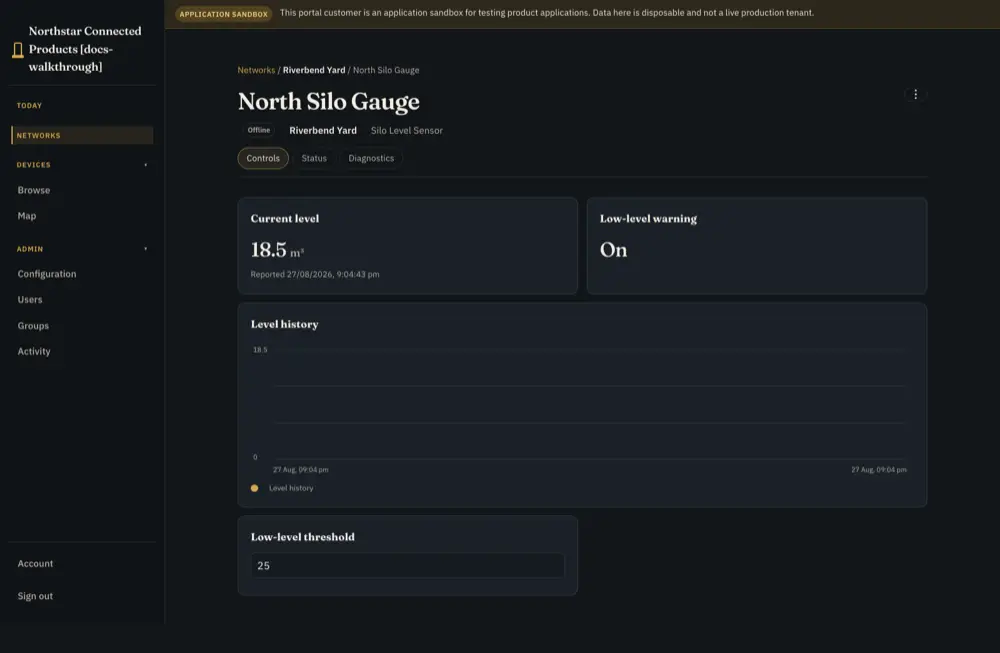
Customer application · level-monitor reference
Bring the unit and time range through the permitted private support path. Check the evidence and proposed next action.
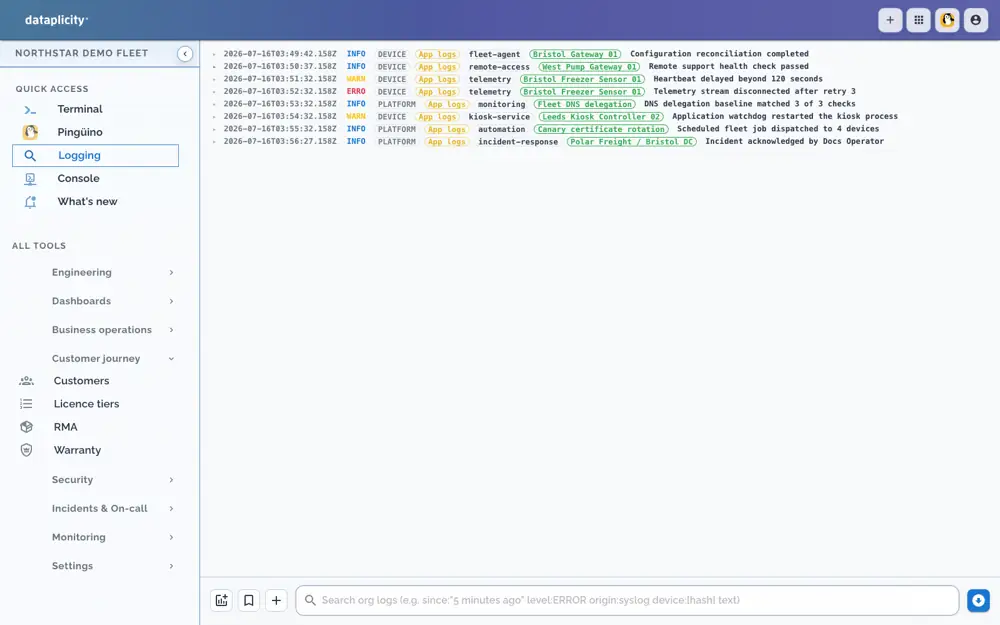
Demo operating evidence · access depends on the conversation
24/7 AI help has plan and usage limits. Invite a specialist with chosen context for read-only team discussion; private operational help has separate authority. Human escalation is asynchronous.
See the full workflow and requirements →Illustrative operating sequence. People choose the scope and intervention; configured collection, rules and device behaviour supply the evidence.
Step 1
Provide the customer job, operating constraints and what your application already does. Nutria can help connect the requirement to supported product data, controls and customer experience. Supply external designs and unique requirements; they are not automatically known.
Step 2
Equidna, the hardware and firmware specialist, works from the exact board/revision and supplied schematics or netlists through the Linux interface, permissions and product integration. Review uncertainty and define a bench test; guidance does not certify hardware.
Step 3
In Casa del Pingüino, invite an offered specialist, choose whole-conversation or selected-reply scope and whether earlier history is included. Teammates can retain the confirmed design decisions and next tests in the conversation.
Step 4
For device evidence and supported operational actions, use the appropriate private support conversation with Pingüino. Review the proposed scope and action, then check the resulting state. A room invitation does not unlock those actions.
Illustrative team request, not a captured transcript or an assistant execution result.
“Our controller operates locally. We need to expose settings and report whether a requested change happened.”
“Customers should see only their own machines and know when a change is waiting for an offline unit.”
Invite an offered specialist to Casa del Pingüino. Choose conversation or selected-reply scope and history. Ask it to separate responsibilities, integration points, uncertainty and bench tests. Shared help is read-only under sponsor authority; invitation does not grant unrestricted account or device access.
Invitation and context guideA shared conversation and private operational assistance have different permissions.
Use Pingüino’s private support path for permitted device/fleet evidence. Review supported action proposals, target and authority before approval, and verify the result afterwards.
Follow the full device investigationEquidna connects supplied board evidence to firmware, Linux interfaces and product behaviour. No deployed fleet or separately programmed chatbot is required to begin the design discussion.
Hardware and firmware engineeringPlatform knowledge and explicitly granted context support the discussion. Invited room specialists use sponsor authority and granted conversation/history; shared-room help is read-only. Linked documents, boards, canvases and account objects are not all automatically readable.
24/7 AI assistance; plan and usage conditions apply. This is not 24/7 human staffing or an uptime SLA. Human escalation is an asynchronous support ticket where offered. An assistant suggestion is not execution evidence, a repaired device or a qualified design.
Configuration, product engineering and subscription eligibility are different requirements.
Use the existing specialist chooser or team-room invitation. Supply relevant requirements, exact hardware evidence and redacted findings. Choose context deliberately and keep private device operations in the supported private path.
Keep your engineering team, design tools, firmware, application and validation process. Assistance can precede agent installation and span any adoption path; it is not the final upgrade tier.
Equidna and Pingüino are web-app specialists for Standard, Business+ and Enterprise within configured access. Free and Device Access have bounded guidance and different specialist choices. Team conversations are a paid capability; mobile technical help uses Delfín. Check the chooser and usage notice.
Read the guide →Use the exact implementation guides to check the supported contract and limits.
Configuration and implementation requirements.
Read the guide →Configuration and implementation requirements.
Read the guide →Configuration and implementation requirements.
Read the guide →Ask for help where evidence or an integration decision is unclear. Use the context and permissions available to that conversation.
Equidna helps connect supplied hardware evidence to the software path; Nutria helps plan the customer job; Pingüino helps investigate authorised operational evidence. Shared-room help remains read-only. 24/7 AI assistance has plan and usage conditions.
Read the guide →Use the reference to build your own test. Validate the hardware, integration and operating process on your product.
Review the procedure and qualify the parts your product requires.
Read the guide →Start with the product you have, then choose independent optional paths.
Read the guide →Use the existing specialist chooser or team-room invitation. Supply relevant requirements, exact hardware evidence and redacted findings. Choose context deliberately and keep private device operations in the supported private path.